BUILT FOR DEALERSHIP FIXED OPERATIONS

Control the flow.
Protect the promise.
Prove the improvement.

Live dispatch, recon tracking, and advisor follow-through for dealership service departments.

LiveDispatch for service, recon, Detail & PDI
90-DayPerformance tracking
Role-BasedAdmin • GM • Advisor • Tech • BDC
app.getroflo.com
ROFlo Daily Dispatch board with live repair orders, promise times, technicians and Express waiter performance
↗
Operational improvement Measured from locked Day Close data
SEE IT IN UNDER 2 MINUTES

A quick tour of the service drive.

Demo dealership data. Includes music; captions are built in, so you can watch with the sound off.

ONE RO, START TO FINISH

See the work. Act on it. Prove it.

Fewer missed promisesEvery RO on one live board, warned before the promise passes.
Faster recon to the front lineEvery used car tracked by stage, red at 3 days in the shop.
Follow-up that gets doneSpecial orders and missed recalls, each with an owner.
PRODUCT TOUR

See the real screens.

These are actual ROFlo 2.0 screens, shown with a demo dealership. Pick a screen to see what each role works from every day.

Advisors • Dispatch • Technicians

Daily Dispatch

Every live RO in one view: promise time, waiter or drop, shop, assigned technician, status, and minutes to promise, with Express waiter time measured as the day happens.

  • Red-zone and past-due ROs surface before the promise is missed
  • Upsells and split lines stay attached to the original RO
  • Express ≤60-minute and Main Shop on-time performance, live
1 / 10
app.getroflo.com
ROFlo Daily Dispatch screenEnlarge screen ⤢
PROVE THE CHANGE

Not just a dispatch board. Proof it’s working.

Every closed day is locked and compared to the baseline your store sets at the start, not an industry average. After 90 days, you have a clear before-and-after picture of what changed.

These are measured changes against your own baseline. Staffing, season and car count move the numbers too, so we review them with you at day 90 and tell you plainly what ROFlo likely did and didn’t drive.

Completed ROs
Daily throughput against your own baseline.
Express waiter time
True Express-only cycle time and the share finished within 60 minutes.
Main Shop on-time %
Final RO completion compared to the promise made to the customer.
Express wait hours saved
Customer wait time saved on Express waiters, in hours.
app.getroflo.com
ROFlo 90-day performance tracking with completed ROs and Express waiter trends against baseline
Demo dealership data
HOW IT STARTS

No integration project. Up and running in a day.

ROFlo works alongside your DMS instead of replacing it, so a store can start with the reports it already has and measure the difference from the first closed day.

  1. 1

    Set up in a day

    A step-by-step setup checklist walks your admin through day one: shops and technicians, advisors and logins, the recall area, report emails, and the baseline the store starts from (daily completed ROs and average Express waiter time).

  2. 2

    Run the drive in ROFlo

    Advisors, technicians, recon, Detail, and PDI work from live boards. Each day closes into locked history.

  3. 3

    See your results

    Every closed day is compared to your store’s own baseline: throughput, waiter time, on-time %, and Express wait hours saved, with a one-click report for the dealer principal.

How buying works

Book a walkthrough and we’ll look at your store’s problem areas and go over the price for your store. ROFlo is billed per store by the quarter, with no long-term contract: cancel with 30 days’ notice before a quarter ends. We set your store up with you, using the reports you already have.

WHAT IT TAKES EACH DAY

Who does what.

ROFlo works alongside your DMS. Here is the daily effort, by role.

AdvisorsWrite up the RO in ROFlo (or snap a photo of it) and update the promise when more work is sold.
Dispatcher or foremanAssigns the tech from the board. ROFlo suggests who.
TechniciansTap Diagnosing, Repairing, Waiting on parts or Complete from their phone.
Arrives on its ownXtime appointment and advisor reports by email, the weekly recall scan, and Day Close at 2 AM if nobody runs it.
Every morningThe DMS Technician Time report, scheduled from Dealertrack (or uploaded), so ROFlo matches each tech’s hours to the DMS.
Once a weekUpload the DMS RO export so ROFlo can catch missing, voided or skipped RO numbers.
ONE OPERATING SYSTEM

One operating view across your service drive.

Customer ROs, internal work, and the follow-through in between usually live on whiteboards, spreadsheets, and memory. ROFlo puts them on one live system, built around four jobs.

01

Run today’s drive.

Everyone works from the same live board, so the next move is obvious before a promise is missed.

  • Daily DispatchEvery live RO, promise time, shop, technician, and status on one board.
  • Snap ROPhotograph an RO on a phone and it’s read for you: times, waiter or drop, jobs, and hours from your op code library.
  • Promise alertsRed-zone and past-due ROs surface while there is still time to act.
  • Suggested techsThe top three techs for every job in one score: speed on that same job, A/B/C level, a fair share of gravy work, and room left today.
  • Technician capacityDaily and weekly hours against each tech’s goal, before you dispatch.
  • Upsells that stay attachedAdded work, sold hours, and revised promises tied to the original RO.
  • Tomorrow PrepTomorrow’s appointments load from your scheduling emails automatically, with workload by shop and tech assignments, ready today.
  • Parts prep alertsParts gets an email of likely needs, including tires a day further out, before the vehicles arrive.
  • Saturday coverageLet a trusted advisor or GM add and dispatch Saturday ROs, then catch any skipped RO numbers on Monday.
02

Move internal work.

Used cars, Detail, and PDIs get their own dispatch boards instead of fighting customer work for attention.

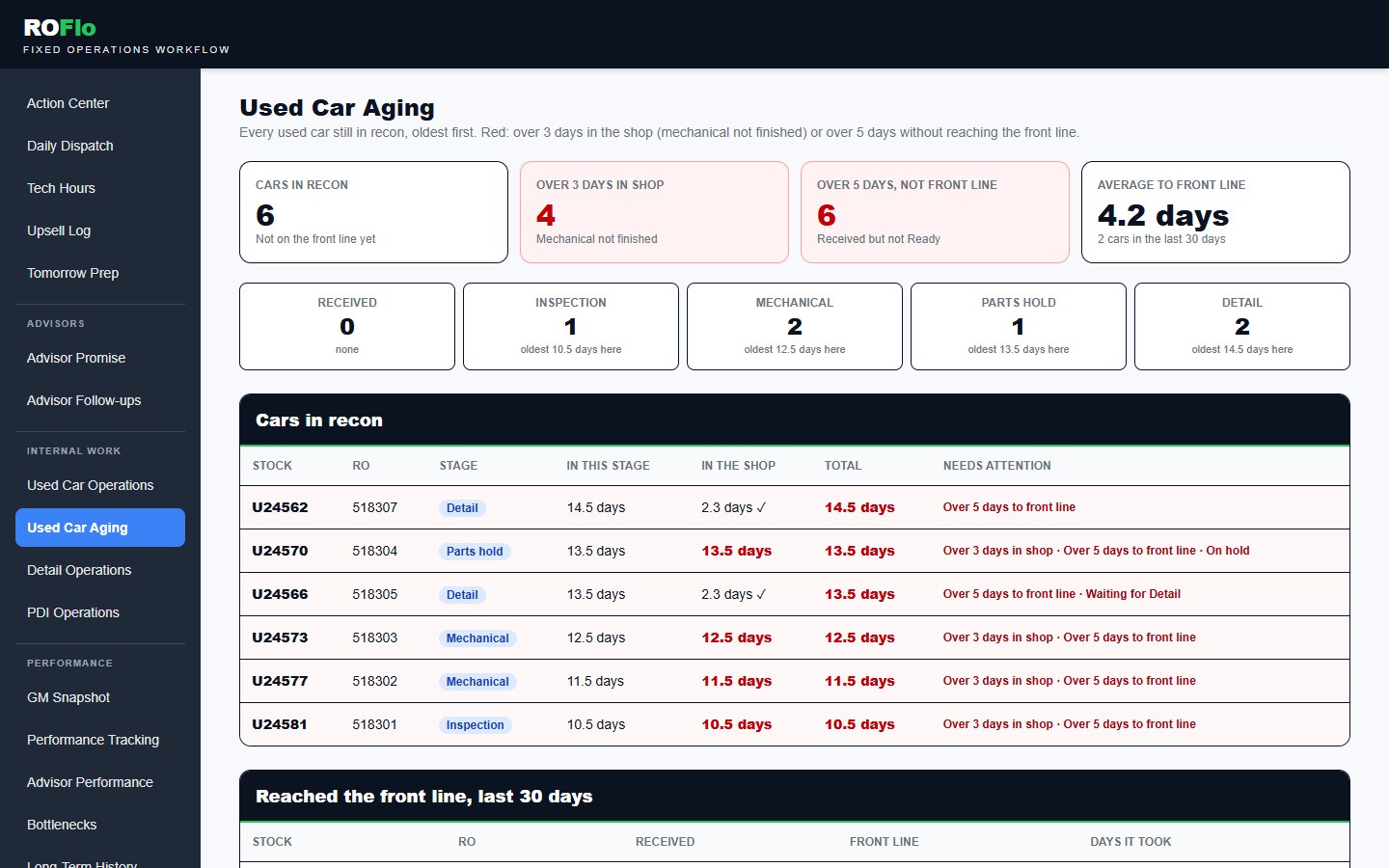
  • Used car reconInspection, mechanical, parts hold, Detail, ready, with recon days on every unit. Marking a car Ready closes its open recon jobs at their credited hours, and warns you first if its Detail RO is still open.
  • Detail dispatchFlat-rate Detail jobs linked to the used car or new vehicle they belong to, matched by stock number even when the Detail RO comes first.
  • PDI dispatchNew-vehicle prep and delivery detail, assigned and tracked to done.
  • Separate from customer payInternal hours count toward the tech’s day, never toward CP or Express numbers.
03

Close every loop.

Techs and advisors mark work finished right on the board, and every recall and special order has an owner and a status.

  • Finish on the boardTechs mark their lines complete and advisors finish their own ROs right from Daily Dispatch. No extra queue.
  • Advisor promise scorecardRed-zone, past-due, and on-time % by advisor, so coaching is based on facts.
  • Missed recallsRecall opportunities assigned to advisors with status, notes, and appointments. Each new report clears what’s already done.
  • Special order partsKnow when parts arrive and that the customer was actually called.
  • Tech Time CheckThe DMS technician time report is the final word on hours. Once a day is closed, ROFlo matches it, flags missed ROs, and every change can be undone.
  • DMS reconciliationUpload the DMS report to catch missing, voided, duplicate, and hidden ROs, and flag skipped RO numbers.
  • Recall opportunitiesFind used vehicles on nearby lots with likely open recalls, and route each dealer to someone to call.
04

Prove the improvement.

Leadership sees what changed, measured against the store’s own starting point.

  • GM SnapshotROs past promise, completed and open ROs, recon days, and Detail and PDI production at a glance.
  • Day CloseEach day is locked into history, automatically at 2 AM if nobody closes it, so results don’t shift after the fact. Corrections, like DMS-matched tech hours, are kept with the date and reason.
  • Advisor performanceThe nightly Xtime report loads on its own: CP labor, hours per RO, and pace to each advisor’s monthly goal and the team goal.
  • 90-day trackingTrends for ROs, Express waiter time, on-time %, and Express wait hours saved.
  • BottlenecksWhere work waits, week over week, including time techs mark Waiting on parts or Waiting on approval.
  • Audited correctionsLabor changes require a reason and leave a record. Nothing is silent.
USED CARS & DETAIL

A car in recon is money sitting still.

See every used car in one place, how long it’s been there, and what it’s waiting on, while there’s still time to move it.

  • Used Car Aging: every car oldest first, red at 3 days in the shop or 5 days without reaching the front line
  • Mechanical and Detail tracked separately, so you know who has it
  • Tech and detailer hours credited without touching customer-pay numbers
app.getroflo.com
ROFlo Used Car Aging: every used car oldest first, with days in stage, in the shop and to the front line
SNAP RO

Snap an RO. ROFlo builds it.

Backed up at the counter, or nobody at the dispatch desk on a Saturday? Take a photo of the RO. ROFlo reads it, handwriting included, and has it ready to check and create in seconds.

How it works
  1. 1
    Snap it on any phone

    Dispatchers, advisors, and GMs take a photo of the whole RO. No app to install.

  2. 2
    ROFlo reads it

    RO number, write-up time, the advisor, each job and op code, pay type, and the handwriting: “Waiter 11:15” becomes the promise and “Give to Roger” pre-assigns the tech. Shop and hours come from your op code library, and the library learns your shop’s real times: after five ROs in a row with the same hours, that becomes the time for that op code.

  3. 3
    Check the yellow, then create

    On the desktop, anything unclear or handwritten is highlighted in yellow. Confirm it and the RO is on the dispatch board. Nothing reaches the board unchecked.

ROFlo doesn’t save the photo or keep the customer’s name, address, phone, or email. To read it, the photo is sent to our AI provider, Anthropic.

app.getroflo.com
ROFlo photo RO review screen with unclear and handwritten fields highlighted in yellow
Snap RO on a phone: RO sent for review
Demo data — fictional RO
SUGGESTED TECHS

Dispatch that learns your shop.

The best dispatchers know who is fastest on brakes and who still has room after lunch. ROFlo learns the same things from your own finished work and suggests the top three techs for every job.

How it works
  1. 1
    It watches every finished RO

    Who did which kind of job, how long it took against book time, and which jobs usually pay well over the time they take, over the last 60 days.

  2. 2
    One score, with reasons

    Speed on that same kind of job counts most. Then each job’s A, B or C grade against the tech’s level, a fair share of the gravy work, hours still open, and room left against the daily goal. Every pick says why.

  3. 3
    You still decide

    Suggestions start after a week of history and get sharper with every RO. ROFlo never assigns work on its own.

app.getroflo.com
Add RO · Front brake pads and rotors · 2.0 hrs · Waiter
Suggested by ROFlo
⭐ J. Averydone 14 similar jobs · usually 80% of book time on these · B job · B tech · room for 4.5 hrs today
M. Ortizdone 6 similar jobs · usually 95% of book time on these · B job · A tech · room for 6 hrs today
S. Klinedone 2 similar jobs · usually 110% of book time · B job · C tech · 1.5 hrs still open · room for 2 hrs today
Demo data — fictional techs
RECALL OPPORTUNITIES

Find recall work sitting on nearby lots.

Used vehicles for sale at other dealers in your area often still have open recalls. ROFlo finds them every week and turns them into a call list, so your shop can offer to do the recall work the manufacturer pays for.

How it works
  1. 1
    Scan nearby lots, automatically

    Every Monday, ROFlo searches used inventory within your radius and screens each vehicle against NHTSA recall campaigns for its model and year.

  2. 2
    Confirm the VIN

    One click opens the official NHTSA VIN lookup. Mark it confirmed open or clear, and ROFlo records who checked and when.

  3. 3
    Work the dealer list

    Dealers are ranked by how many candidates they have. Assign a dealer to a BDC agent or advisor, call, and track every lead to scheduled.

app.getroflo.com
ROFlo Recall Opportunities: nearby dealers ranked by recall candidates, with VIN confirmation and lead status
Demo data — fictional dealers and VINs
DO THE MATH FOR YOUR STORE

What could a few more ROs a day be worth?

Added revenue per month $23,100 $277,200 per year
Also try recall follow-up and fewer recon days

Recall follow-up

$2,500 per month in added revenue

Fewer recon days

$2,000 saved per month in holding cost

This is an example using your own numbers. It isn’t a promise of results, and it shows revenue, not profit. Your 90-day report measures what actually changes against your store’s baseline.

BUILT FROM THE DRIVE

Built by a service director,
not a software company.

“Every screen in ROFlo started as a real problem on a real service drive: a missed promise, a stalled used car, a customer nobody called back.”
Neal Guidarelli, founder of ROFlo
Neal Guidarelli Founder · Service & Parts Director at a Toyota dealership Indianapolis, Indiana · 219-617-0934

Neal started on the service drive as an advisor, the first at his store to reach the dealer group’s President’s Club, then moved up to service lane manager and to Service & Parts Director. He runs a high-waiter Toyota service drive every day.

ROFlo grew out of the tools he built for his own drive: dispatch, technician hours, wait times, capacity, upsells and carryovers. It is built for the people running fixed operations: control today, prepare for tomorrow, and see whether the process is actually improving.

REQUEST A DEMO

See ROFlo on a real service-drive workflow.

Tell us where your operation is getting stuck — waiter time, dispatching, technician capacity, used car recon, Detail or PDI, advisor accountability, recalls, special orders, or something else — and we’ll tailor the walkthrough around it.

  • A live walkthrough of the screens your team would use, built around your problem areas.
  • How results are measured, against your store’s own baseline.
  • What you would need to start: the reports you already have, no DMS integration project.
Request your ROFlo demo

Tell us a little about your operation and we’ll tailor the walkthrough around the way your service drive actually works.

No account required. Your information is used only to respond to your ROFlo demo request.